C++ Programming · Part 1 of 11 · January 2, 2024
C++ #1 Data and Memory
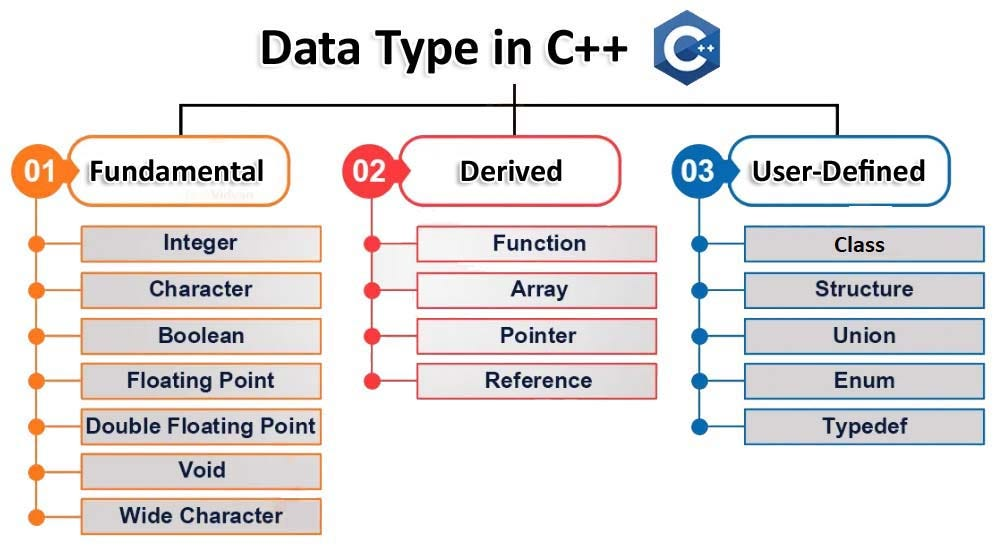
This note covers C++ numeric types and memory management.
Variable Types
The variable types that may be covered are as shown above. In this article, a byte refers to an 8-bit memory unit, i.e., 1 byte = 8 bits.
Simple Variables
Classification
- Integer types: char (1 byte), short (2 bytes), int (4 bytes), long (4 bytes), long long (8 bytes).
- Floating-point types: float (4 bytes), double (8 bytes), long double (12 or 16 bytes).
The boolean type (bool) has only true and false. C++ interprets 0 as false and any non-zero value as true.
C++11 provides fixed-width integer types: int16_t, int32_t, int64_t. Their sizes are 16 bits, 32 bits, and 64 bits (i.e., 2/4/8 bytes) respectively.
Representation
Integer representation:
- If the integer is signed, bit 0 always indicates sign (1 = negative, 0 = positive); the remaining bits represent the magnitude.
- If the integer is unsigned, all bits represent magnitude.
float (32 bits) representation:
- Bit 0 / Sign bit (1 bit): Indicates sign. 1 = negative, 0 = positive.
- Bits 1–8 / Exponent (8 bits): Indicates range.
- Remaining bits / Mantissa (23 bits): Indicates precision.
For example: Present -15.5 in binary bits.
-
Sign: Negative, so the first bit is 1.
-
Absolute value: 15.5 = 15(int) + 0.5(decimal)
-
Binary transform: 15 = (1111)_2, 0.5 = 1/2 = 2^(-1) = (0.1)_2
-
Offset: 15.5 = (1111.1)_2 = 1.1111 * 2^3, offset = 3+127 = 130 = (10000010)_2
-
Mantissa: 1.1111 → .1111 → (fill to 23 bits) (11110000000000000000000)_2
Now combine all the binary parts, -15.5 = (1 10000010 11110000000000000000000)_2
Double (64 bits) representation:
- The calculation steps are the same as for floats.
- Sign bit: 1 bit, exponent: 11 bits, mantissa: 52 bits.
Type Conversion
C++ allows assigning a value of one type to a variable of another type.
In general, assigning to a type with a larger range usually causes no problems (e.g., int to long). However, converting a large long to float can lose precision because float has only about six significant digits.
Converting a value with a larger range to a smaller type (when it exceeds that type's range) typically copies only the rightmost bytes.
Memory
Memory is the computer's storage space for program instructions, data, and state. The main memory of a computer system is organized as an array of M contiguous byte-sized cells, each with a unique physical address.
Storage consists of a sequence of contiguous cells; each cell represents a bit with only 0/1 states. Eight bits form a byte. The byte is the smallest unit of memory addressing; each byte has a unique address, so the computer can access the correct byte via its address.
Memory Address Space
The range of all addressable memory addresses is the computer's addressable memory range. This set of addresses is called the memory address space. The address space is related to whether the system is 32-bit or 64-bit. A 32-bit system can address 2^32 bytes = 4GB; if the computer is 32-bit, installing more than 4GB of RAM does not use the extra memory.
The Nature of Variables
In C/C++, defining a variable is syntactically simple.
C++int a = 999;
char c = 'c';
When we declare a variable, we request a portion of memory to store it. For example, an int occupies 4 bytes, so we need 4 bytes. Numbers are stored in two's complement form; 999 in two's complement is 0000 0011 1110 0111—every 4 bits are stored in a byte.
Bytes can be stored in two orders: either 0000 0011 1110 0111, or reversed. Storing the high-order byte at the low address is big endian; the opposite is little endian. Big endian matches human reading order. This order is called byte order.
We can determine the system's byte order with C++ code. For example:
C++int main() {
    int num = 1;
    char* ptr = reinterpret_cast<char*>(&num);

    if(*ptr==1) {
        cout << "Little-endian" << endl;
    } else {
        cout << "Big-endian" << endl;
    }
    return 0;
}
We can do this because the integer num is initialized to 1 (0x0000 0001), and by casting its pointer from int* to char*, we access the first byte. If the system is little endian, the first byte is 1; otherwise it is 0. By checking the first byte, we know the byte order.
Generally, PCs and Macs use little endian; network transmission (especially TCP/IP) uses big endian. Linux varies.
Memory Regions
When a program runs, code, data, etc. are stored in different memory regions. These regions are logically divided into: code section, global/static storage, stack, heap, and constant section.
Code Section
Also the .text segment. The code section holds the program's binary code. It is read-only to prevent accidental modification at runtime. It may also contain read-only constants such as string literals.
Global / Static Storage
Stores global and static variables. Memory in this region persists for almost the entire program lifetime. For example:
C++int globalVar = 0;

void function() {
    static int staticVar = 0;
    staticVar ++;
    cout << staticVar << endl;
}

int main() {
    function();
    function();
    return 0;
}
Here, globalVar is a global variable and staticVar is a static variable; both reside in global/static storage.
static Keyword
A few notes on the static keyword:
- Inside a function: For example, static int inside void function()—a static variable declared inside a function retains its value for the entire program lifetime. Even after the function returns, the static variable's value is not lost; on the next call it still has the previous value. In the program above, calling function() twice outputs 0 and 1 respectively, even though the non-static local variable should have lost its value after the first call.
- In a class (modifying a variable): A static member variable declared in a class is shared; all objects of that class access the same variable. Static members are declared in the class but must be defined and initialized outside the class. This makes them suitable for the singleton pattern, for example: Note that in this class, health is marked static int, so we can modify/use health in main() without creating a GameManager instance. Here, the singleton is implemented by creating a static GameManager instance in getInstance(). Because the variable is static inside the function, it is not recreated on subsequent calls.
C++#include <iostream>

class GameManager {
public:
    static int health;

    static GameManager& getInstance() {
        static GameManager instance;
        return instance;
    }

    GameManager(const GameManager&) = delete;
    GameManager& operator = (const GameManager&) = delete;

    void show() {
        std::cout << "This is the GameManager singleton instance." << std::endl;
    }

    static void showHealth() {
        std::cout << "Health:" << health << std::endl;
    }

private:
    GameManager() {}
};


int GameManager::health = 0;

int main() {
    GameManager::health = 80;
    GameManager::getInstance().show();
    GameManager::showHealth();

    return 0;
}
- In a class (modifying a method): A static member function can be called without instantiating an object. Static member functions can only access static members, not non-static members. In the code above, note the difference between the (non-static) function show() and the static function showHealth().
In any case, static variables are stored in global/static storage. Remember that.
Stack
The Stack stores local variables, function parameters, and return addresses when functions are called.
When a function returns, the stack space allocated to it is automatically freed. For example:
C++#include <iostream>

void function(int a, int b) {
    int s = a + b;
    std::cout << s << std::endl;
}

int main() {
    function(3, 4);
    return 0;
}
Here, s is a local variable and a and b are function parameters, so their data is on the stack. When function() returns, the corresponding stack space is reclaimed.
Heap
The Heap is used for dynamic memory allocation. Memory allocated with new in C++ (or malloc in C) resides in the heap. We must manually free this memory, or we risk memory leaks. For example:
C++#include <iostream>

int main () {
    int* array = new int[10];
    delete[] array;
    return 1;
}
Constant Section
String literals and other compile-time constants reside in the Constant Storage section, which is typically read-only.
Memory Management
Dynamic Memory Allocation
When a C/C++ program needs additional virtual memory at runtime, we use a dynamic memory allocator to request new memory blocks.
The Dynamic Memory Allocator maintains a process's virtual memory region—the heap. The allocator treats the heap as a collection of blocks of various sizes; each block is a contiguous chunk of virtual memory that is either allocated or free.
Allocated blocks are in use by the application; free blocks are available. When a block is no longer needed, we must free it so future requests can use it. Freeing can be:
- Explicit: e.g., free in C, delete in C++
- Implicit: e.g., Garbage Collector in Java, C#
When the program needs to use a block, it asks the dynamic memory allocator to allocate one. Allocation is always explicit, e.g., malloc in C, new in C++.
Memory Fragmentation
Sometimes the total amount of free memory could satisfy a malloc/new request, but because the free blocks are physically split into many small pieces scattered across the heap (or separated by allocated blocks), new cannot obtain one contiguous block large enough. This is memory fragmentation.
This is also called external fragmentation. Internal fragmentation can also occur: an allocated block is larger than its payload because the allocator may have given it a larger block to meet minimum block size requirements.
Free Lists
The free list is the data structure the allocator uses to find and use free blocks. There are many ways to implement it.
Implicit Free List
A simple block structure might be:
- Header: Block size (first 29 bits) and allocation status (last 3 bits, 001 = allocated, 000 = free).
- Payload: The payload requested by malloc/new.
- Padding (optional): May satisfy alignment or other requirements.
Free blocks are implicitly linked through the size field in the header (traverse from the heap start, find blocks with allocation bit 0, compare sizes).
Advantages: simple conceptually and in implementation. Disadvantages: slow.
Explicit Free List
In an explicit free list, each free block has pred and succ pointers after the header, pointing to the previous and next free blocks. Allocated blocks are the same as in the implicit case. Allocation time goes from linear in total blocks to linear in free blocks. Free time can be O(N) or O(1) depending on whether we store the list in LIFO order or by address.
Explicit lists optimize first-fit time but require a larger minimum block size (free blocks must store header and pointers), potentially increasing fragmentation.
Segregated Free Lists
Instead of one free list, we maintain multiple size classes and search within the list for that size class.
References
- 编程指北公众号: https://csguide.cn/cpp/memory/what_is_memory.html
- C++ Primer Plus.