C++ Programming · Part 2 of 11 · January 14, 2024
C++ #2 Struct and Union
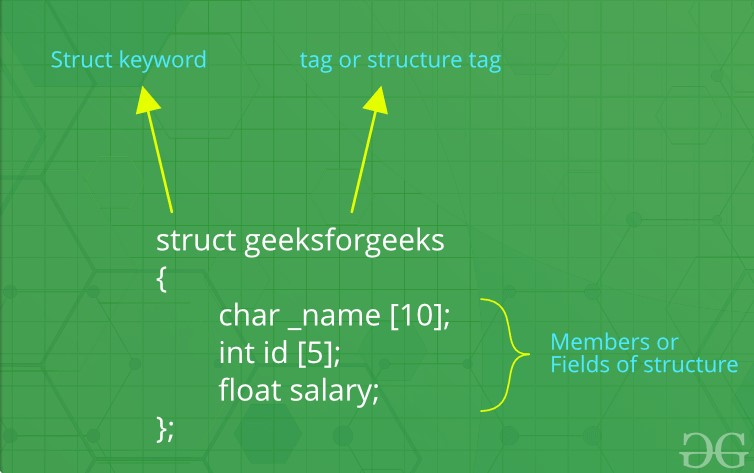
This note is mainly about the use of struct and the similar union in C++, as well as their actual memory footprint. This type of data structure is also called a Heterogeneous Data Structure.
Struct
Declaration
The declaration of a struct is very simple. The syntax for defining a structure named StructName is as follows.
C++struct StructName {
    DataType1 member1;
    DataType2 member2;
    // ...
};
The way to declare a structure variable is
C++StructName myStruct;
Here, the members of the structure can contain different types of data members, such as int, float, char, or other structures, arrays, or pointers.
Accessing the members of a structure requires the dot operator (.). For example, myStruct.member1;
Initialization
It can be initialized at the time of declaration
C++StructName myStruct = {value1, value2};
You can also declare a pointer to a structure. After that, use the arrow operator (->) to access the members of the structure pointed to by this pointer.
C++StructName myStruct = {value1, value2};
StructName *myStructPtr = &myStruct;
std::cout << (myStructPtr -> member1); // not myStructPtr.member1 !
Memory Alignment
For structures, memory alignment is an important strategy that involves how to arrange the members of a structure in memory to optimize access speed and reduce the waste of memory space.
The following are the basic principles of memory alignment:
- Alignment of the starting address of the structure. For example, if the largest member in the structure is
uint32_t, which occupies 4 bytes, then the starting address of the structure is very likely to be aligned on a 4-byte boundary. - Alignment of structure members. Each member within the structure is usually aligned relative to the starting address of the structure to the natural alignment boundary of that member's type. For example, a 4-byte
intmember is usually aligned on a 4-byte boundary. - Alignment of the total size of the structure. The total size of the structure is usually padded to align with the alignment boundary of the largest member. This means that the size of the structure may be larger than the sum of the sizes of all its members.
To satisfy the basic alignment principles above, the compiler will sometimes add extra unused memory between structure members or at the end of the structure, which is also called Padding. This Memory padding helps ensure that each member is at the appropriate memory address.
Example
Suppose we have the following structure definition.
C++struct SomeExample {
	char a; // 1 byte
	int b;  // 4 bytes
	char c; // 1 byte
}
According to the alignment rules, the layout of this structure in memory might be as follows:
- The largest member in memory is
int, occupying 4 bytes, so we align on a 4-byte boundary. char a: Occupies 1 byte. Padded with 3 bytes.int b: Occupies 4 bytes.char c: Occupies 1 byte. Padded with 3 bytes.
At this point, the total size of the structure is 12 bytes. As long as its starting position is a multiple of 4, the position immediately following its end will also always be a multiple of 4.
In a structure, the compiler usually lays out the members in the order they are declared and adds necessary padding according to the alignment requirements of each member. Therefore, if we adjust the order of the structure declaration:
C++struct SomeExample {
	char a; // 1 byte
	char c;  // 1 byte
	int b; // 4 bytes
}
Then, according to the rules of memory alignment, the layout of this structure in memory might be as follows:
char a: Occupies 1 byte. No padding.char c: Immediately followsa, occupies 1 byte. Padded with 2 bytes.char c: Occupies 4 bytes, no padding.
At this point, the total size of the structure is only 8 bytes, which is a full 1/3 less than before. And it still meets the requirements of memory alignment.
In some cases, programmers might adjust the alignment strategy due to pointer arithmetic issues. Sometimes the second case above is not necessarily better than the first case, because in the first case, we can quickly obtain the address of each member by adjusting the starting position according to the size of int, while in the second case, the step size for moving the pointer is sometimes 1, sometimes 2, and sometimes 4. Ultimately, the declaration of the structure should be adjusted according to the specific needs of the project.
Memory Location
In C++, data types are stored in different locations depending on how they are declared and their lifecycle. This includes classes and structures, which may also be stored in different locations in memory depending on how they are declared.
The areas in memory where data can be stored include the following:
- Text Segment: Used to store the executable code (machine instructions) of the program. It is usually read-only to prevent the program from accidentally modifying its instructions. When the operating system loads the program, it maps the text segment as read-only memory.
- Data Segment: Stores initialized global variables and static variables. The data segment is initialized by the operating system when the program starts and is released when the program ends. The data segment exists throughout the entire lifecycle of the program.
- Read-only Data Segment: Stores read-only data, such as string literals and constants. The read-only data segment is usually read-only to prevent the program from accidentally modifying this data.
- BSS Segment (Block Started by Symbol): Stores uninitialized global variables and static variables. The BSS segment is initialized to zero when the program starts executing. Unlike the data segment, it does not occupy any actual space in the file, but is allocated and cleared to zero by the operating system when the program is loaded.
- Heap: Stores dynamically allocated memory. Heap memory is managed by the programmer and can be dynamically allocated and released while the program is running. The size of heap memory is usually larger than the stack, but it needs to be manually released, otherwise it may cause memory leaks.
- Stack: Stores local variables, function parameters, return addresses, etc. Stack memory is automatically managed by the operating system and features a Last-In-First-Out (LIFO) structure. Each time a function is called, a stack frame is allocated, and when the function returns, the stack frame is released.
Below are common data types and their storage locations in memory.
Local Variables (Stack)
Local variables are usually stored on the stack, and their lifecycle is within the scope of the function where they are located. When a function is called, a stack frame is allocated, and when the function returns, the stack frame is released.
For example,
C++void foo() {
	int x = 10;
}
Global and Static Variables (Data Segment)
Global variables and static variables are stored in the data segment. These variables are allocated when the program starts and released when the program ends.
C++int globalVar = 10;

void foo() {
	static int staticVar = 20;
}
Dynamically Allocated Variables (Heap)
Variables dynamically allocated via new or malloc are stored on the heap. The lifecycle of these variables is controlled by the programmer and requires manual release using delete or free.
C++void foo() {
	int* p = new int(10);
	delete p;
}
Constants (Text Segment or Read-only Data Segment)
String literals and other constants are usually stored in the text segment or the read-only data segment.
C++const char* str = "Hello World!";
Based on the introduction above, it is not difficult to determine that the storage locations of structures and class objects in C++ also depend on how they are declared and allocated. The following are several common situations and their storage locations:
If a structure or class object is declared as a local variable in a function, it is usually allocated on the stack. For example,
C++void foo() {
	struct MyStruct {
		int a;
		int b;
	};

	MyStruct s;
}
Global or Static Variables (Data Segment)
If a structure or class object is declared as a global or static variable, it will be allocated in the data segment. For example,
C++struct MyStruct {
	int a;
	int b;
};

MyStruct globalStruct;

void foo() {
	static MyStruct staticStruct;
}
Dynamic Allocation (Heap)
If a structure or class object is created through dynamic allocation (for example, using the new operator), it will be allocated on the heap. For example,
C++struct MyStruct {
	int a;
	int b;
};

void foo() {
	MyStruct *p = new MyStruct();
	delete p;
}
Class Members
If a class object contains other classes or structures as members, the storage location of these members depends on the storage location of the object that contains them. For example,
C++struct InnerStruct {
	int a;
	int b;
};

struct OuterStruct {
	InnerStruct inner;
};

void foo() {
	OuterStruct outer;
	OuterStruct *p = new OuterStruct();
	delete p;
}
These rules apply to most situations in C++. However, in special cases, such as when using a custom memory allocator, the storage location may vary.