C++ Programming · Part 4 of 11 · February 11, 2024
C++ #4 Functions
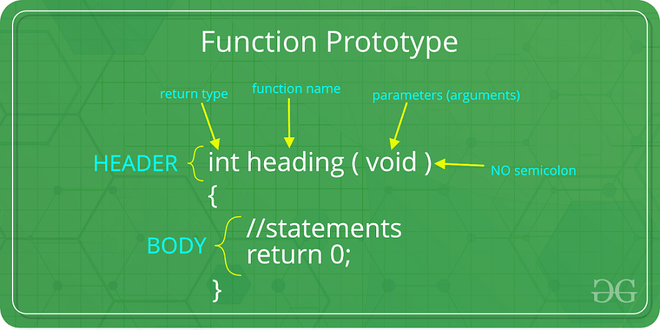
This note is mainly about common functions in C++ and related knowledge points.
Basic Knowledge
To use a C++ function, you must complete the following three tasks:
- Provide the function definition (Definition)
- Provide the function prototype (Prototype)
- Call the function (Reference / Call)
Defining Functions
Functions without a return value are called void functions, which can have no return, so they are sometimes called procedures or subroutines. Functions with a return value must have a return.
C++void FunctionName (paramList) {
    statements;
    return; // optional
}

int FunctionNameAnother (paramList) {
    statements;
    return 0; // must return an int
}
In the parameter list paramList, each parameter must specify its type.
Typically, a function returns its value by copying it to a designated CPU register (Register) or memory unit.
Function Prototypes
C++ requires providing a prototype for a function. Therefore, we need to understand the reasons behind this and how to provide a prototype.
Reasons
The prototype tells the compiler the type of the function's return value and the type and number of its parameters. If the compiler had to search the entire text every time a function is used, it might be inefficient because it would have to jump out of main(). Furthermore, the function might not even be in the file; C++ allows a program to be placed in multiple files, compiled separately, and then combined. In this case, when the compiler compiles main(), it may not yet have access to the function code, so we want the function prototype to provide this information.
Syntax
Basically, you just need to remove the entire curly brace part of the function implementation and replace it with a semicolon. In the function prototype, the names of the parameters are not important and can even be omitted.
// prototype
double Volume(int h, int w, int d);
// or double volume(int, int, int);

// definition
double Volume(int h, int w, int d) {
    return h * w * d;
}
Passed by Value
C++ usually passes by value (Passed by values), meaning that when a function is called, what is actually passed to the function is a "copy" of the argument, not the original data itself. This way, the passed-in parameter itself will not be affected by the function's statements.
Among them, actual parameters (argument) and formal parameters (parameter) are two very important concepts:
- Actual parameters: Refer to the specific values or variables passed to the function when it is called. It is the actual data used by the caller during the function call.
- Formal parameters: Refer to the variables written inside the parentheses after the function name when defining the function, serving as the function's input.
For example,
void add(int x, int y) { // parameter x and y
	int sum = x + y;
	std::cout << "Sum:" << sum << std::endl;
}

int main() {
	int a = 5;
	int b = 10;
	add(a,b); // arguments a and b
	return 0;
}
Impact of Passing by Value
- Performance: Passing by value creates a copy. If a large object or structure is passed, the creation and destruction of the copy may lead to high performance overhead.
- Data Security: The benefit of passing by value is that the original data will not be accidentally modified by operations inside the function, which can improve code safety and stability in certain situations.
Passed by Reference
Unlike passing by value, passing by reference (Passed by References) means the function parameter is a reference to the passed argument. Any modification to the formal parameter inside the function will directly affect the actual argument.
Syntactically, adding & after the parameter type indicates passing by reference.
void modifyValue1(int &x) { x = 10; }
void modifyValue2(int x) { x = 10; }

int main() {
	int a = 5;
	int b = 5;
	modifyValue1(a); // a is now 10
	modifyValue2(b); // b is still 5
}
Passed by Pointer
Passing by pointer (Passed by Pointers) means the function parameter passes the address of the argument. Through the pointer, the function can access and modify the content of the argument.
Syntactically, adding * before the parameter type indicates passing by pointer. When calling the function, the address of the variable needs to be passed.
void modifyValue3(int *x) { *x = 10;}

int main() {
	int a = 5;
	modifyValue3(&a); // pass the address of a
    // a is now 10
	return 0;
}
Function Pointers
A function pointer is a special type of pointer in C++ that can point to a function and can be used to call that function. The concept of function pointers is very useful in certain programming scenarios, such as implementing callback functions, dynamic function calls, or passing functions as parameters.
For example, suppose there is a function as follows,
int add(int a, int b) {
	return a + b;
}
To define a function pointer pointing to this function, you can write it like this,
int (*funcPtr)(int, int);
Where,
- int is the return type of the function
- (*funcPtr) is the name of the function pointer, where * indicates it is a pointer.
- (int, int) is the parameter list of the function.
Using Function Pointers
After defining a function pointer, you can assign the address of a function to it, for example
funcPtr = add;
Or initialize it directly during definition:
int (*funcPtr)(int, int) = add;
Then, we can call the function through the function pointer, with syntax similar to a normal function call:
int result = funcPtr(2,3);
In this example, funcPtr(2,3) actually calls add(2,3), and the value of result is 5.
Application Scenarios
- Callback functions: Function pointers are passed as parameters to another function to implement a callback mechanism. For example, in event-driven programming, a callback function to be executed when an event occurs can be specified via a function pointer.
- Dynamic function calls: In some cases, which function to call can be dynamically selected based on conditions. For example, when simulating menu option selection, function pointers can be used to call different processing functions.
- Function arrays: You can define an array of function pointers to store a set of functions with similar functionality and call different functions via an index.
Note:
- Function pointers point to the address of the function in the code segment, not data.
- Similar to regular pointers, function pointers can also be null pointers. Therefore, before using a function pointer, you need to ensure it has been correctly initialized to avoid program crashes caused by null pointer calls.
Inline Functions
An inline function (inline function) is a special type of function in C++. Its main purpose is to improve program execution efficiency by eliminating the overhead of function calls. Inline functions must be defined in header files (.h or .hpp) rather than implementation files (.cpp files); they are essentially direct replacements of machine code.
In C++, we can declare an inline function using the inline keyword. For example,
inline int add(int a, int b) {
	return a + b;
}
In this example, the add function is declared as an inline function, and the compiler will attempt to insert the code of the add function directly at the call site every time the add function is called.
Inline functions also have their advantages and disadvantages.
Advantages:
- Performance: Inline functions are direct replacements of machine code, avoiding function call overhead, suitable for small functions that are simple and frequently called.
- Compiler Optimization: The code of an inline function can be more closely integrated with the context of the call site, providing more optimization opportunities.
Disadvantages:
- Code Bloat: If an inline function is called multiple times and the function code is inserted at each call, it may eventually lead to a larger executable file, especially when the function size is large.
- Uncontrollable Compiler Behavior: Even with the inline keyword, the compiler may choose not to inline the function depending on the specific situation, especially in scenarios like large function sizes or recursive calls. Conversely, the compiler may also decide to inline certain functions on its own without the inline keyword.
- Debugging Difficulty: The expansion of inline functions can make debugging difficult because tracing each function call in a debugger may no longer be simple and direct.
Header Files and Implementation Files
As mentioned above, inline functions need to be defined in header files rather than implementation files. Header files and implementation files play different roles in C++ programming; their essential difference lies in code organization and purpose. Understanding the difference between the two is crucial for writing and maintaining C++ programs.
Header files (header file) are mainly used to declare interfaces, including function declarations, class definitions, macro definitions, constant definitions, template definitions, etc. Header files usually do not contain specific implementation details, except for inline functions which must provide their implementation in the header file.
Implementation files (implementation file) contain the specific implementations of functions and class methods. An implementation file is usually paired with one or more header files and is used to define the functions and methods declared in the header files. Header files are usually included in implementation files via the #include directive, and the implementation file is the main body of the compilation unit, which the compiler compiles into an object file.
Overloading
Function overloading (function overload) is an important feature in C++ that allows defining multiple functions with the same name within the same scope, as long as their parameter lists are different. Function overloading improves code readability and flexibility, allowing the same function name to perform different operations based on different input parameters.
To successfully overload a function, the overloaded function must meet one of the following conditions:
- Different parameter types: The parameter types of the functions are different, for example, one function accepts an int parameter and another accepts a float parameter.
- Different number of parameters: The number of parameters of the functions is different, for example, one function accepts two parameters and another accepts three parameters.
- Different parameter order: Function overloading can also be achieved when parameter types are different and their order is different.
Note that:
- The return type does not participate in overload resolution. If two functions differ only in their return type, the compiler will report an error.
- When using default parameters, care must be taken to avoid ambiguity. If the overloading of two functions makes it impossible for the compiler to determine which function to call, a compilation error will occur. For example,
void display(int x, int y = 10);
void display(int x); // Error: The compiler cannot determine which function to use when calling display(5)
- When the parameter lists of two overloaded functions are close enough, it may cause the compiler to be unable to make a clear choice, leading to a compilation error, for example,
void show(double d);
void show(float f);

show(5.0f); // Ambiguous call, the compiler may not be sure which version to call
Templates
A function template (function template) refers to a blueprint or template used to create generic functions that can accept different types of parameters. When using a template, the compiler automatically generates the corresponding function instance based on the actual parameter types passed.
Templates are defined using the template keyword, followed by a template parameter list. Template parameters are usually represented using the typename or class keywords.
template <typename T>
T add(T a, T b) {
	return a + b;
}
Then, we can automatically use this function elsewhere.
int main() {
	int x = 5, y = 10;
	double p = 3.14, q = 2.71;

	cout << add(x,y) << endl; // int add(int, int)
	cout << add(p,q) << endl; // double add(double, double)
	return 0;
}
Here, T is a template parameter that can represent any type. When calling add, the compiler generates the corresponding function instance based on the passed parameter types. In most cases, the compiler can automatically deduce the type of the template parameter, but if necessary, you can also explicitly specify the type of the template parameter:
cout << add<int>(5,10) << endl;
However, it is important to know that the compiler must be able to correctly deduce the type that T refers to. For example, add(3, 2.5) will cause a compiler error because when 3 appears, the compiler thinks T is int, but when it processes 2.5, it finds that T should be double. In this case, the compiler will report an error. Of course, to solve this problem, the template can be made to accept multiple parameters using different template parameters:
template <typename T, typename U>
T multiply(T a, U b) {
	return a * b;
}

int main () {
	cout << multiply(5, 2.5) << endl;
}
Specialization
Template specialization allows you to provide special implementations for specific types. Usually, specialization provides a different implementation for a specific instance of a template.
For example, full specialization refers to providing a specific implementation for all parameter types of the template.
template<>
const char* add(const char* a, const char* b) {
	return strcat(a, b);
}
In this example, the add function provides a specialized version for the const char* type, used for string concatenation.
Advantages of Templates
- Code Reuse: Templates allow you to write code once and then reuse it across multiple types without having to write separate functions for each type.
- Type Safety: Compared to traditional C macros, templates provide type safety, avoiding errors that might occur when converting between different types.
- Simplify Code: Through templates, you can avoid writing multiple functions for similar functionality with different types, reducing redundancy.
Limitations of Templates
- Increased Compilation Time: Since templates are instantiated at compile time, the use of templates leads to an increase in compilation time.
- Code Bloat: Templates can lead to code bloat, especially when a template is instantiated on many different types, as the compiler generates a separate copy of the code for each type.
- Debugging Difficulty: Error messages for template code are sometimes complex, especially when template nesting and type deduction fail, making debugging potentially difficult.
Performance Analysis
Function Memory Usage
Variables
- Automatic variables: Variables declared in a function are private. When a function is called, the computer allocates memory for these variables, and when the function ends, the computer releases the memory used by these variables.
- Static variables: If a variable in a function is declared as static, its memory will be allocated in the global memory area, i.e., the data segment or BSS segment. This allows it to persist throughout the entire lifecycle of the program.
- Dynamic memory allocation: If new or malloc is used in a function to allocate memory, memory blocks will be allocated on the heap. The programmer must be responsible for releasing this memory; otherwise, a memory leak will occur. It is not necessary to release memory applied for in a function within the same function, but the programmer must know which part of the memory was applied for and how to release that part of the memory elsewhere later.
Function pointers are essentially pointers to an address in the function's code segment. The memory occupied by the function pointer itself is the same as other pointers, usually 4 bytes or 8 bytes, depending on the system architecture. The actual code pointed to by the function pointer is located in the code segment (.text segment), while the pointer itself is stored in the stack, heap, or global area, depending on its declaration location.
Function Templates
Function templates themselves do not occupy memory; corresponding code is generated only when the template is instantiated into a function of a specific type.
If there are multiple instantiations of different types, each instantiated function will occupy independent memory space. Since templates generate actual code at compile time, the compiler generates separate function code for each type, and this code is stored in the code segment.
Function Overloading
Function overloading is essentially defining multiple functions with the same name but different parameters. Each overloaded function is independent, and the compiler generates independent code for each overloaded function, which is also stored in the code segment. Therefore, function overloading occupies memory space for multiple function instances.
Function Recursion
Each recursive call allocates a new stack frame on the stack to store the function's local variables and return address. The deeper the recursion depth, the more memory is occupied on the stack. If the recursion depth is too large, it may lead to a stack overflow.