Visual Computing Systems · Part 1 of 2 · September 26, 2024
VCS #1 Tile-Based Renderer
This document is the blog/documentation for Assignment 1 of the CMU 15-473/673 Visual Computing Systems course. The assignment involves implementing a sort-middle algorithm for a tile-based renderer.
Data Processing
SIMD
In this project, I will use Intel SIMD (Single Instruction Multiple Data) data types to pass coordinates, specifically we will use __m128. It is a data type specific to the Intel SIMD instruction set, particularly used for the Streaming SIMD Extensions (SSE) family of instructions. It represents a 128-bit register that can simultaneously store and manipulate four 32-bit floating-point values.
To process __m128, we need to use specific APIs for basic arithmetic operations. In this assignment, we specifically need the following APIs to complete the work.
C++#include <xmmintrin.h>
int main () {

    // Addition
    __m128 result_addition = _mm_add_ps(1.0f, 2.0f);
    __m128i result_addition_int = _mm_add_epi32(1,2);

    // Subtraction
    __m128 result_subtraction = _mm_sub_ps(1.0f, 2.0f);
    __m128i result_subtraction_int = _mm_sub_epi32(1,2);

    // Multiplication
    __m128 result_mul = _mm_mul_ps(1.0f, 2.0f);
    __m128i result_mul_int = _mm_mullo_epi32(1, 2);

    // Division
    __m128 result_div = _mm_div_ps(1.0f, 2.0f);

    // Set to zero
    __m128 zero = _mm_setzero_ps();

    // Set to values
    __m128 one = _mm_set_ps(1.0f, 2.0f, 3.0f, 4.0f);

}
We can also use SIMD instructions to handle comparisons and bitwise operations.
C++#include <xmmintrin.h>

int main () {

    // Equality comparison
    __m128 result_equal = _mm_cmpeq_ps(1.0f, 1.0f);
    __m128i result_equal_int = _mm_cmpeq_si128(1,1);

    // Less than comparison
    __m128 result_lessThan = _mm_cmplt_ps(1.0f, 2.0f);
    __m128i result_lessThan_int = _mm_cmplt_si128(1,2);

    // Greater than comparison
    __m128 result_greaterThan = _mm_cmpgt_ps(1.0f, 2.0f);
    __m128i result_greaterThan_int = _mm_cmpgt_si128(1,2);

    // Bitwise AND
    __m128 result_and = _mm_and_ps(1.0f, 2.0f);
    __m128i result_and_int = _mm_and_si128(1,2);

    // Bitwise OR
    __m128 result_or = _mm_or_ps(1.0f, 2.0f);
    __m128i result_or_int = _mm_or_si128(1,2);
}
N.4 Format
In this assignment, vertex positions will be stored in fixed-point representation with 4-bit subpixel precision, which is called the N.4 format for floating-point values—n bits for the integer part and 4 bits for the fractional part.
For example, the binary expression 1001.0110 can be understood as:
- Integer part: 1001 = 9.
- Fractional part: 0110 = 6/16 = 0.375
So this number is 9.375.
The N.4 format is widely used in GPUs to reduce floating-point calculation costs. Additionally, one of the most important operations for the N.4 format is rounding. Using this definition, for the binary representation of an N.4 format floating-point number a, we can use bit shifts to perform floor and ceil operations.
Rasterization
Point-in-Triangle Test
When we want to rasterize a scene, we will call the RasterizeTriangle() function. This function takes a region of the output image and a triangle as input. It then identifies all 2×2 pixel blocks within this screen region that might be at least partially covered by this input triangle.
During this process, we need to determine whether the triangle actually covers the sampling points in this 2×2 pixel block—this is called the triangle coverage test. This part is handled by the TestQuadFragment() function—it takes the coordinates of four screen points as input, corresponding to the pixels in this block. Its output is a bitmask indicating which of these points are inside the triangle, as shown in the figure below.
 Since an
 __m128 register can hold up to 4 integers, we will use two registers to store the x and y coordinates of the four sampling points in the quad 2×2 fragment (in N.4 fixed-point format, as described in the comments).
Edge Equations
To test if a pixel is covered by a triangle, we use edge equations. Label the -th vertex of the triangle as . For a query point , we first calculate
The edge equation for the -th edge is calculated as
The necessary and sufficient condition for point to pass the point-in-triangle test is
(E_0 > 0 \& E_1 >0 \& E_2>0) || (E_0 < 0 \& E_1 < 0 \& E_2 < 0).
That is, the edge equations must have the same sign. If a point falls exactly on an edge (i.e., ), we check if that edge belongs to the current triangle. We can check this by accessing isOwnerEdge[i]. If isOwnerEdge[i] is true, it means the edge belongs to the triangle, so we consider all points on that edge to be inside the triangle.
Now, the edge mask should be clear.
Now that we have the TestQuadFrag() function, which returns a bitmask indicating whether each fragment's sample is covered, we will be able to rasterize the triangle. We will do this in the RasterizeTriangle() method. The way we rasterize a triangle can be summarized as: find all candidate pixels and test the coverage of each pixel using the TestQuadFrag() we have already written. We will receive the following inputs
regionX0,regionY0: The top-left coordinates of the current working tile.regionW,regionH: The pixel width and height of the current working tile.tri: Sets the triangle equations; we save the coordinates of the triangle vertices.triSIMD: All values of tri in SIMD registers.processQuadFragmentFunc(): A function value—for each quad fragment that might produce coverage, this method should call this function.
Finding the Bounding Box
To speed up the test without missing any possible candidates, we first find the bounding box of the triangle to decide which coordinates to look at. By using the bitwise operations for N.4 format floating-point numbers discussed in Section 2.2, we will be able to do this easily.
Iterating Through All Quad Fragments
Now we can start iterating through all possible fragments covered by the triangle by simply applying a for loop. For each quad fragment we look at, we save the pixel coordinates (bottom-left, bottom-right, top-left, top-right) into registers. Then, we will call the TestQuadFragment() method to see if this triangle is accepted. We will use a simple acceptance condition where all quads must pass the test.
Sort-middle Tile-Based Renderer
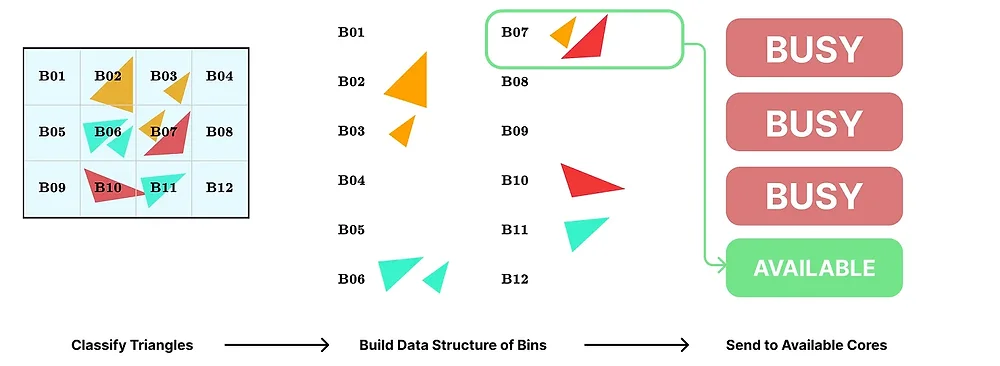
Now we will begin implementing the sort-middle tile-parallel renderer. The tile renderer will have two stages:
- Putting triangles into bins. It will build a data structure where each screen tile has a bin, and each bin contains a list of triangles that might overlap with that tile.
- Processing bins in parallel, dynamically assigning the next unprocessed bin to the next available core.
The process is shown in Figure 2.
 Figure 2: Sort-Middle tile parallelization scheme. The stages are briefly shown in the figure.
Initialization
In tile-based rendering, we divide the screen into smaller tiles, which we call bins. Each tile will be responsible for processing the triangles within it. Typically, to improve performance, we will classify triangles by the tiles they cover. This process is called binning.
An intuitive way to track bins is to use a vector of tiles, where each tile is a vector of projected triangles, which we call bins. However, when binning is handled in a multi-threaded context, multiple threads might process triangles simultaneously and put them into the corresponding bins. If they write directly to the global bins, it might lead to:
- Race conditions. Multiple threads writing to the same data structure—potentially leading to data inconsistency or even program crashes.
- Performance bottlenecks. To avoid race conditions, we need to apply locks to ensure thread safety—but this will almost certainly be slow because it reduces parallelism.
Thread-Local Bins
To solve the above problems, we introduce thread-local bins, maintained by a data structure we call threadLocalBins. Now, each thread has its own independent data structure to maintain bins. When thread i performs binning, it writes data to its own threadLocalBins[i]. By using thread-local bins, we also avoid using locks, thereby reducing synchronization costs. Once each thread completes its own binning, we need to merge everyone's local bins into the global bins and hand them over to ProcessBins() for processing.
Steps
The following steps describe the work we need to complete in BinTriangles().
- Initialization. Assume the screen is divided into
gridWidth×gridHeighttiles. Global bins: It will be a vector of vectors of ProjectedTriangles, with a size ofgridWidth×gridHeight. Thread-local bins: It will be a vector of vectors of vectors of ProjectedTriangles, as it will track all local bin structures for all threads. That is,threadLocalBins[threadId]returns the local bins for thethreadId-th thread. - Thread-local binning. Each thread will only process a portion of the triangles in the scene. They will put triangles into
threadLocalBins[threadId]based on their own triangle coverage. Note that this also indicates that most bins inthreadLocalBins[threadId]will be empty, as a single thread will only process one or a few tiles. For each thread, tiles outside its scope of responsibility can be considered empty, as shown in Figure 3.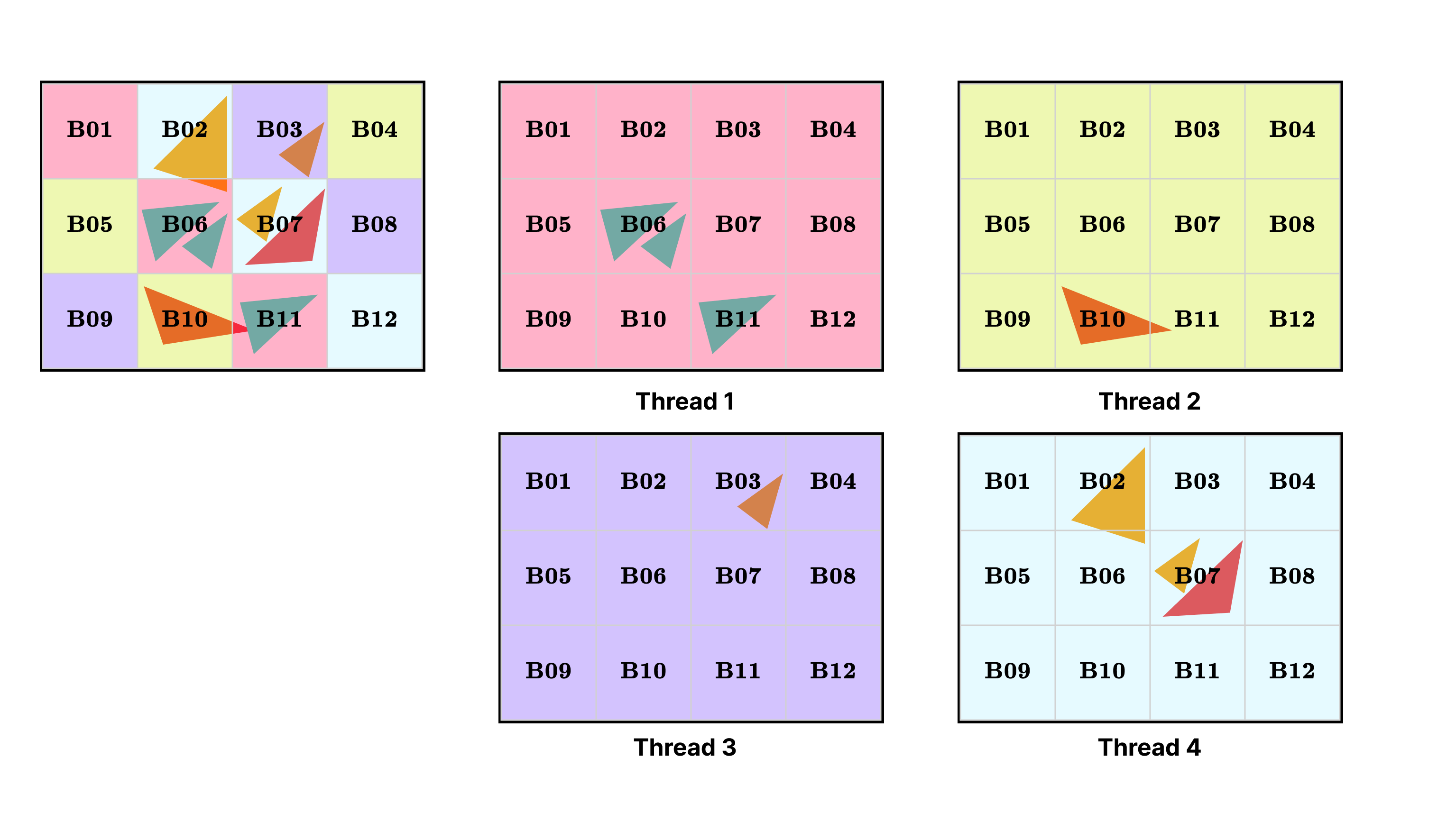
- Merging into global bins. After all threads have completed binning, we merge all local bins from
threadLocalBinsinto the global bins, where triangles are sorted by tile. For each tile, we merge the triangle sub-lists from all threads. In these sub-lists, the triangles are located within this tile. - Processing global bins. Finally, we iterate through the global bins and process each triangle in the tiles. Since each tile is processed independently, we will run
ProcessBin()on multiple threads.
Figure 3: Thread-local bins. The 4-thread renderer in the figure is processing 12 bins. For each thread, it has a thread-local bin structure that only processes a portion of the triangles in the scene.
Binning Triangles
What we do next is process the bins in the global bins. For each tile, we will call ProcessBin() to rasterize the fragments in the bin. Note that in a tile-based renderer, parallelism occurs between tiles, not between fragments. Processing within a tile is sequential. Therefore, we will call ShadeFragment() once to shade a single quad fragment, rather than calling ShadeFragments() on a full fragment buffer as in a non-tiled implementation.
Framebuffer Tiles
Instead of writing directly to the framebuffer, we update colors and depths to the framebuffer. One advantage of a tile-based renderer is that the entire framebuffer tile will fit in the cache. For optimal performance, we will write the results to a tile-major framebuffer structure while processing the tile, and then copy the results back to the renderer's framebuffer at the end.
Adaptation
Since rasterization occurs at the granularity of quad fragments, the loop runs over the triangles in the tile and iterates through each of the four fragments. We will call the RasterizeTriangle() we wrote in Section 3.2, with the region size specified as the sub-framebuffer size of the current tile.
The following are some technical challenges we might need to address:
- Since we are shading fragments directly (instead of shading fragments in a fragment buffer), we will call
ShadeFragment()instead ofShadeFragments(). Looking at the interface ofShadeFragment(), we need to know which thread is processing the triangle currently being handled. Otherwise, we will use the wrong vertex output buffer or index output buffer. - Since we are writing to a tiled framebuffer, we need to handle indices carefully.
- Specifically, there is a triId parameter in the
ShadeFragment()interface—this is not a member variable of the ProjectedTriangle class. This is the index of the loop when we were binning this triangle inBinTriangles().
To solve these issues, we need to carry and propagate this information. For ease of handling, we will maintain a vector of BinnedTriangle structs, where the struct holds the thread ID, the loop index, and the projected triangle.
Now we will be able to process the entire bins.
Completion
After processing is complete, we need to write the results back to the framebuffer.